Read, reply, and execute —you stay in control
WeClaw will turn hundreds of unread messages into a clear summary, surface who needs you and what is time-sensitive, then suggest how to reply and prepare drafts for anything requiring follow-up. The last call is always yours.
A desktop app and an OpenClaw Skill — both launching soon.
Preview
Seconds' time
from unread backlog to summary
Reply drafts
suggested wording for messages that need a response
You confirm
action drafts ready to review before anything is sent
From unread chaos to clarity
Hundreds of messages across dozens of chats — distilled into what matters, with replies ready to go. Ask follow-up questions to dig deeper, not just read summaries.
Why WeClaw
Reading messages takes more out of you than it should
The issue is not that you are slow. It is that you are spending real attention and emotional energy on something a tool should be doing for you.
Manual scrolling costs more than time
Reading from top to bottom is the safest option, but also the most expensive. Entire afternoons disappear into message history.
Some messages you dread opening
You do not know what they want but you cannot ignore them. You read to the end only to find it has nothing to do with you. That kind of drain is harder to recover from than lost time.
Muting chats does not remove the anxiety
Silencing everything does not make the uncertainty go away. What actually worries you is not knowing whether you missed the few messages that truly mattered.
What it will do
Read, suggest, and draft — all three
From organizing unread messages to suggesting reply wording, to preparing executable drafts for follow-up tasks — you confirm every step, WeClaw handles the work in between.
See what happened at a glance
Long chat histories are compressed into a structured summary that surfaces the topic, the change, and the outcome first.
Surface who needs you
Mentions, direct asks, and threads that require your involvement are pulled forward instead of staying buried in chatter.
Catch time-sensitive details
Rescheduled meetings, deadlines, confirmations, and other timing signals are extracted so you do not have to hunt for them manually.
Push action items to the front
Messages that likely need a reply, confirmation, forwarding, or follow-up are separated from the rest so the next step is clear.
Not just reading — drafting too
WeClaw will help you figure out what to say
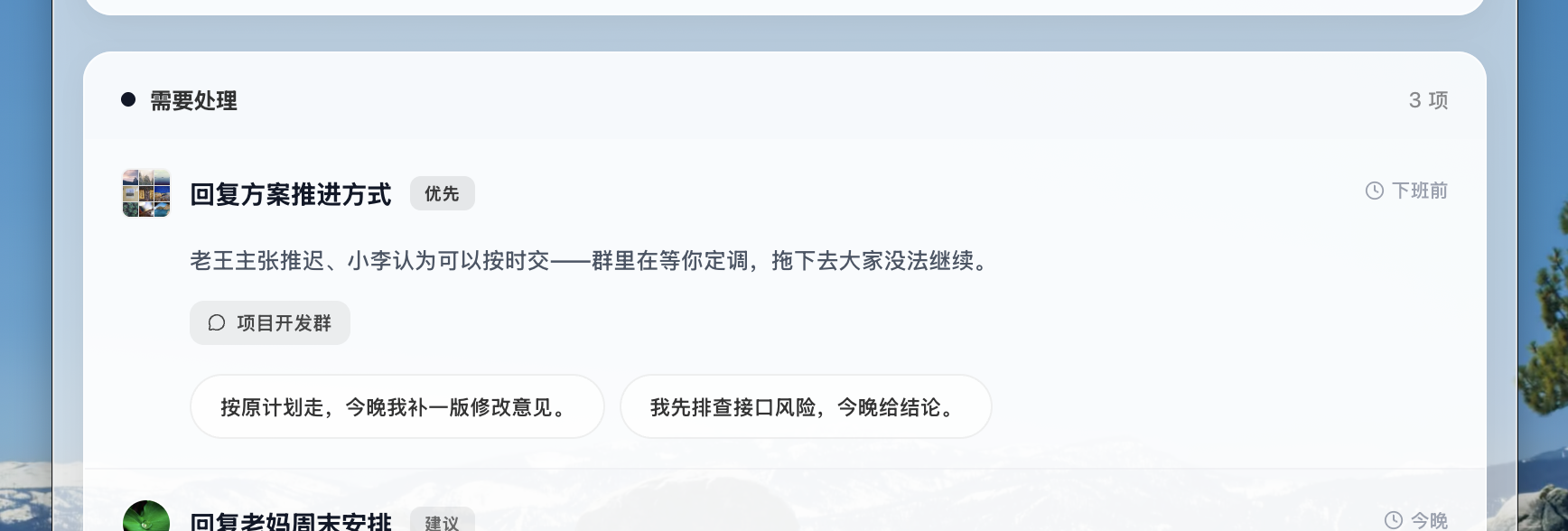
Once you have the summary, WeClaw will suggest reply wording for messages that need a response. Send the suggestion as-is or adjust it before anything goes out.
Reply suggestions, ready to use
No more staring at a screen wondering how to phrase it. WeClaw will draft the wording — you confirm and send.
Task drafts from a single instruction
Tell it "summarize last week's project updates into a note and prepare it to send to Steven — let me review first." It does the work, you make the call.
How It Fits
Adoption should feel lightweight
The goal is not to make you learn another system. It is to get you out of the message pile and back to the things that actually need your attention.
Run it from the desktop app
A resident desktop experience is on the way. Turn unread threads into a summary, get reply suggestions, and prepare drafts whenever you need them.
Plug it in as an OpenClaw Skill
If you already use OpenClaw, the same capability can slot into your existing workflow instead of forcing a new one.
How it works
It handles the work. You keep the final call.
WeClaw will generate summaries, reply suggestions, and action drafts — but sending and committing to actions will always require your confirmation. Its job is to lay out your options, not make your decisions.
What Comes Next
Capabilities keep expanding from here
The core is being built. What follows will ship with clear progress signals rather than vague promises.
Message analytics
See which groups consume the most attention, where noise is coming from, and which communication patterns deserve cleanup.
A unified inbox command layer
Bring multiple message sources into one entry point so scattered inboxes can collapse into a single working surface.
Deeper automation and integrations
Expand into more scenarios where repetitive information handling can be automated, so your time stays focused where your presence actually matters.
Stay in the Loop
WeClaw is on the way.
Subscribe to get notified when WeClaw launches. For early access or integration questions, reach out to the team directly.
Get Notified
Be the first to know
Subscribe to get notified when WeClaw launches. No spam — just progress updates.